

For many of us in operations, our week typically starts with a spike in tickets and urgent asks, followed by sudden outages. Perhaps somewhere in that mess, we were asked to update on our progress on AI operations management. How is this relevant to our day-to-day? Where does AI sit when queues are full, business operations are tight, and teams are already stretched?
Sure, many tout AI in operations, but they gloss over the challenges of working with messy data and legacy systems. At Aloa, we work in that gap. We map actual workflows before building custom internal tools and agent workflows that plug into current systems. We make sure that AI becomes a reliable help for your day-to-day.
Today’s guide will cover:
- A clear definition of AI operations management
- A view of a workday with AI in place
- Concrete use cases and the KPIs they touch
- A phased roadmap to start small and grow with care
By the end, you'll have a short list of next moves that fit your own operation.
TL;DR
- Companies using AI in operations report up to 50% lower forecast errors and far fewer lost sales from stockouts.
- AI automation raises capacity while keeping headcount steady, as teams spend less time on data entry and ticket triage.
- Machine learning in supply chain and maintenance supports safety, quality, and sustainability
- AI operations management improves decision speed and clarity
- A simple phased roadmap and thoughtful tool choices help you prove ROI, avoid tool sprawl, and spread AI across core operations.
What is AI Operations Management?
AI operations management uses artificial intelligence to watch daily workflows, read vast amounts of data, and trigger smart actions that keep work moving. This helps teams reduce manual work, lower errors, and improve operational efficiency.
AI for operations uses intelligent systems plus automation to help plan, run, and improve the core operations of a business. That includes service delivery, supply chain, shared services, and IT reliability. It works across functions, not only in IT or a chatbot project, and leans on data instead of gut feel.
Most setups follow the same basic pattern:
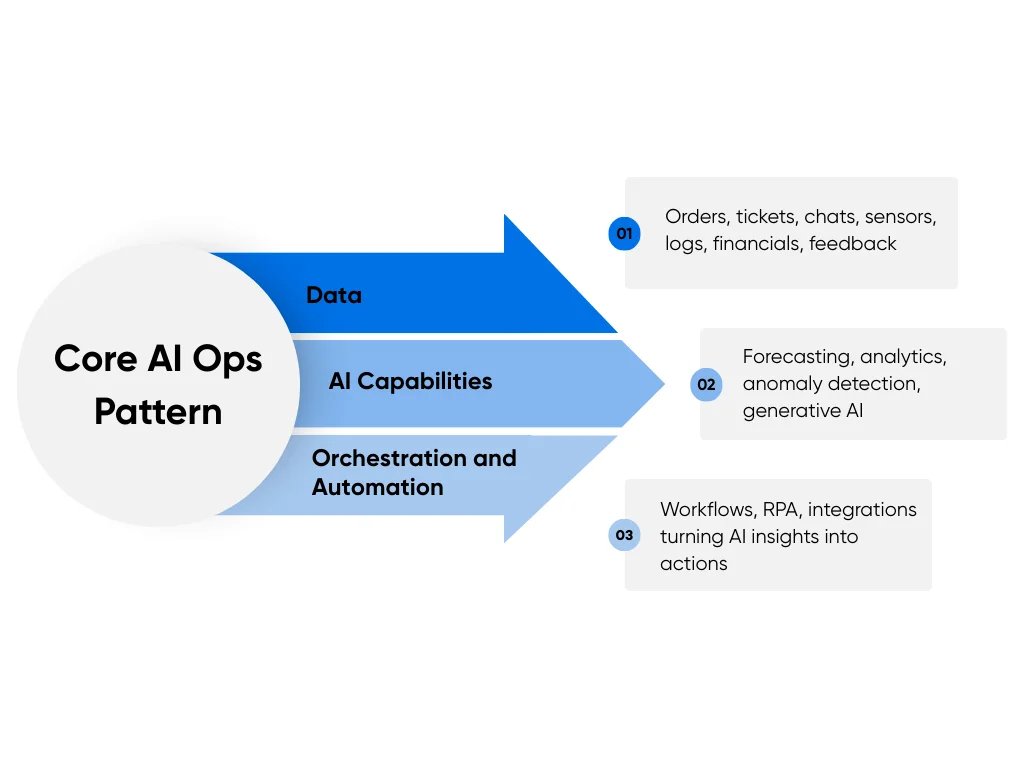
- Data: Orders, support tickets, customer service chats, sensor readings, system logs, financial records, and customer feedback.
- AI Capabilities: Forecasting, predictive analytics, anomaly detection, classification, natural language understanding, content generation with generative AI, and agents that take small steps on their own.
- Orchestration and Automation: Workflow tools, RPA bots, and integration platforms that turn AI outputs into tasks, updates, and alerts.
In practice, that means three layers working together: data, intelligence, and action. Data feeds the models, intelligence spots patterns or suggests next steps, and automation turns those suggestions into real changes in the tools teams already use.
This goes further than basic process automation or RPA, which follows fixed rules and breaks when the pattern shifts. It also goes further than classic analytics, where a report lands in a dashboard but no action fires on its own. AIOps, or AI for IT operations, is one slice of this picture, where AI watches logs and events to predict and resolve incidents faster.
Most of the time, the work sits in shared services centers, IT operations, supply chain and logistics teams, customer support, and finance or HR operations for mid-to-large businesses. These groups already use ERPs, CRMs, ITSM tools, and ticketing systems, even if the use of AI is still light. Our AI in business guide walks through this shift across more functions as well.
A fair question is whether this sounds like a new label on old process work. The main shift is that modern AI learns patterns across systems, adapts as new data comes in, and suggests actions across multiple tools, instead of waiting for someone to write one more rule every time something changes.
What Does AI Operations Management Look Like Day to Day?
Meet Alex, Director of Operations at a US mid-market medical supplies company. The business serves clinics and hospitals across a few states, with shared services, an IT ops team, and a small supply chain group. Alex works in a world of orders, tickets, schedules, and trade-offs from sunrise to late afternoon.
Here is how Alex’s day runs with AI operations management in place:
- Morning: A single dashboard shows forecast demand for key products, likely stock gaps, current inventory levels, and capacity flags for shared services in near real time. AI ranks risk using order history, sensor data from storage, and current tickets, similar to supply chain control towers that merge many data sources into one view.
- Mid-Morning: Shared services staff open queues and see email and form requests already sorted by topic, urgency, and function. An AI classifier reads each message, assigns a category, and routes work to the right team, similar to modern email triage setups in large operations groups.
- Afternoon: An AI assistant reviews ticket history and spots recurring issues from clinics in one region. The assistant suggests a small process change, drafts an updated SOP, and sends a version to Alex for review with clear comments.
- All Day: AIOps software watches logs, alerts, and metrics across servers and networks. The tool groups related events, hides noise, and sends IT ops a short list of urgent incidents with possible root causes, similar to AIOps platforms that reduce alert volume for SRE teams.
By lunch, Alex sees one shared view of demand, supply, tickets, and system health instead of scattered spreadsheets and email trails. The team moves straight into problem-solving, while AI handles scanning, ranking, and routing in the background. For groups who want support shaping this shared dashboard and the agent layer behind, our workflow automation services focus on glue work between AI, data, and current tools.
To see the change, compare life before AI with life after rollout:
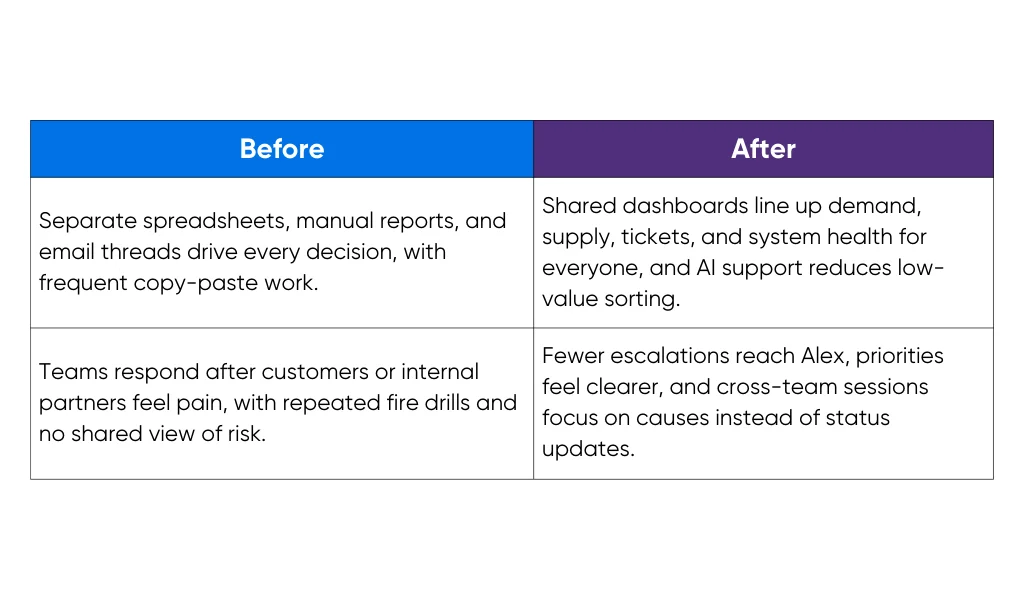
The goal here is not a perfect, calm schedule, because operations always carry some surprises. The shift shows up in fewer last-minute shocks, more time for planning, and fewer meetings spent arguing over which numbers to trust. This is AI for operations as a daily practice, not a side project in a lab.
AI helps, and Alex still holds the steering wheel. During the morning review, AI suggests moving one delivery from Wednesday to Thursday to avoid a stockout at a clinic. Alex approves the change for two regions and keeps the original plan for a high-risk hospital because local leaders warn about a pending surge.
Later, a supply model proposes a new vendor with lower cost but weaker service scores. Alex flags that option as too risky for critical items and asks the team to treat the vendor as a backup only. Near the end of the day, an AIOps alert links slow transactions to a database change. IT ops reviews the hypothesis, confirms part of the story, adds context about a third-party outage, and then chooses the fix.
Across those moments, AI provides eyes, pattern spotting, and drafts, while people choose trade-offs. That balance matters, especially in healthcare or finance settings where safety, regulatory compliance, and trust sit above pure speed.
5 Key Areas Where AI Delivers the Most Value in Operations
When we zoom out from Alex’s day, the same pattern keeps popping up: AI does not touch everything. It shows up in a few big spots where work feels heavy and data already flows.
Think of these five areas as your starter map for AI for operations:
1. Forecasting, Inventory, and Supply Chain
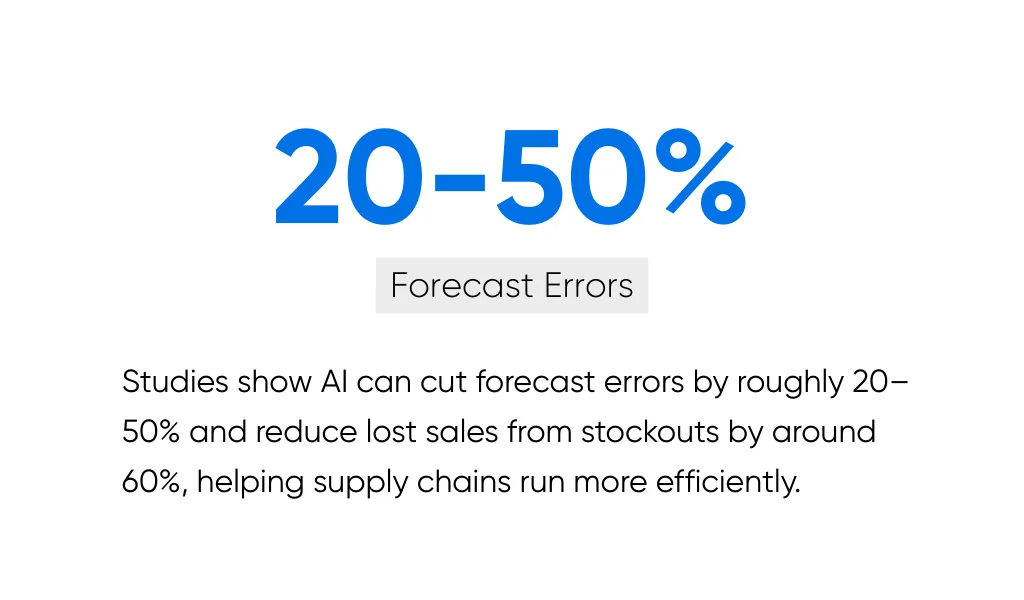
Forecasting AI reads past demand and suggests what comes next. It looks at orders, seasonality, promos, and even things like weather or local events. Studies on supply chains show AI can cut forecast errors by roughly 20 to 50% and reduce lost sales from stockouts by around 60%.
Now make that concrete. A regional medical supplies company feeds three years of order history, promo calendars, and weather data into an AI model. The model predicts demand for masks, gloves, and devices per region, with a range instead of a single number. From there, the system:
- Suggests different reorder points for each product and warehouse
- Raises safety stock on volatile, critical items and lowers it on slow, stable lines
- Proposes weekly production or purchase plans that match demand windows
On the ground, planners stop guessing from last year’s spreadsheet. They see where stockouts are likely, which products will sit too long, and where working capital feels locked. KPIs start to move in the right direction: fewer stockouts, higher inventory turns, better service levels, lower operational costs, and less cash stuck on shelves.
When we help clients through our AI and machine learning services for planning and inventory at Aloa, we focus on that full loop. Data flows in, forecasts update, and your existing tools show clear reorder suggestions. Your team still owns the trade-offs, especially in sensitive areas like healthcare and food.
2. Shared Services, Back Office, and Customer Support
Here, AI tools can serve as a sorter, a reader, or a draft writer.
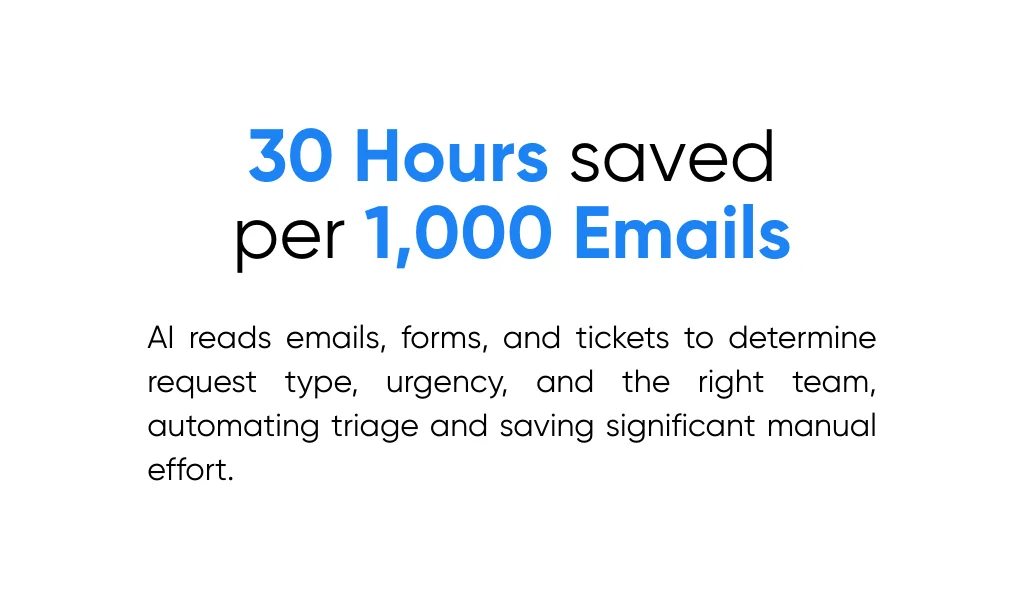
Text models read incoming emails, forms, and tickets. They decide what the request is about, how urgent it feels, and which team should handle it. Some providers report saving around 30 hours per 1,000 emails by letting AI handle triage instead of manual reading.
Picture a shared services inbox that receives finance questions, HR forms, and random “who owns this” messages overnight. By the time the team logs in:
- Requests are tagged with type and urgency
- Each item already sits in the right queue
- Obvious spam and fliers are out of the way
Add intelligent document processing on top. Invoices, claim forms, and contracts pass through a model that pulls amounts, dates, vendor names, and key terms. Only weird or risky items stop for human review.
Support teams feel this, too. Simple requests get auto-replies. Slightly harder ones arrive with a suggested draft response and links to policy, so agents focus on judgment instead of staring at a blank screen. Research from the University of Cincinnati notes that AI in business reduces time on routine tasks and lets staff focus on higher-value work, which is exactly what happens here.
At Aloa, we usually pair this with workflow automation and internal tooling services. That way, AI triage and document reading live inside your ticketing or ERP screens, not in some separate tool no one remembers to open.
3. IT Operations and Reliability
For IT, AI often shows up under the label AIOps, which watches logs, metrics, and alerts all day. It groups events that belong together, hides duplicates, and suggests likely root causes or next steps.
IBM shares real stories of teams using Watson AIOps to fix IT issues in minutes instead of hours. In one incident, it helped cut citizen-reported outages by 68%.
Think about a night where three different systems start to act up. Without AIOps, the on-call engineer sees hundreds of alerts across apps, servers, and networks. With AIOps in place, the platform:
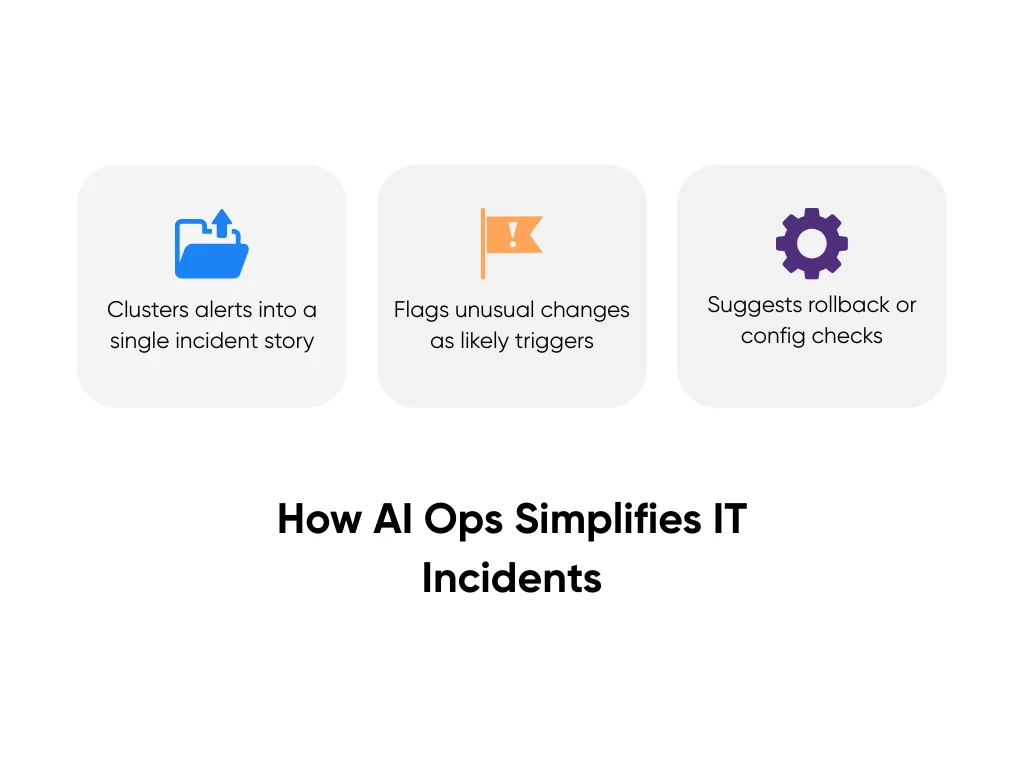
- Clusters those alerts into one incident story
- Flags an unusual database change as a likely trigger
- Suggests a small set of rollback or config checks
By morning, the ops leader sees one resolved incident with clear notes, not a wall of red. KPIs that usually hurt, like uptime, SLA compliance, and MTTR, start to look less scary.
In our AI consulting work around AIOps, we start with your existing performance monitoring tools and on-call playbooks. AI filters and suggests; engineers decide and act. That balance matters a lot for regulated industries where outages and missteps carry more risk.
4. Workforce, Training, and Knowledge
Here, the focus shifts from systems to people.

AI copilots work like internal search partners that speak your language and surface relevant content. They sit inside your tools and pull answers from SOPs, past tickets, docs, and best practices. University research on AI in business links these helpers to faster decision-making and better use of internal knowledge.
Take a new support rep in a healthcare contact center. Week one, they face a ticket about a delayed shipment of critical supplies for a clinic. Instead of digging through folders, they ask a question in chat.
The virtual assistant replies with:
- The step-by-step internal process
- A short, plain language summary
- A draft message to the clinic that follows policy
Later, the same assistant spots repeated questions about one product line and nudges the team lead. Maybe the SOP needs an update. Maybe a short training clip would help.
Over time, new hires ramp faster. Experienced staff spend less time “being the person who knows where everything lives.” Leadership gains a clearer view of where people struggle, without needing one more survey.
When we build these copilots, we draw on retrieval augmented generation and natural language processing so answers stay tied to your own content, not random web pages. If you want a view on how this supports managers, our piece on the benefits of AI in management talks through how leaders blend these tools with coaching and oversight.
5. Continuous Improvement and Decision Support
AI here reads process logs, ticket histories, and communication trails. It looks for steps where work slows, requests loop, or issues repeat. Think of it as a junior improvement analyst that never gets tired of digging through data.
For example, a shared services center feeds six months of workflow data into a process mining tool with AI on top. The tool surfaces three insights:
- One approval step adds an average of two days to every vendor setup
- A specific region drives a large share of repeat billing issues
- Tickets that pass through both support and IT take twice as long to close
From there, leaders test changes. They shorten the approval flow for low-risk vendors. They adjust training and checks for the one region. And they create a joint lane for cases that truly need both support and IT.
On the planning side, advanced analytics helps with “what if” questions. What if demand jumps 20% for two weeks? What if one key vendor fails? AI estimates the impact on backlog, cycle time, and staffing so leaders do not have to guess.
This is where AI for operations starts to feel like a continuous loop, not a one-off project. Data turns into suggestions. Teams try changes. New data feeds the next round. If you want more on that bigger picture, our guide on AI for large enterprises walks through how improvement loops, pilots, and governance fit together.
Across these five areas, AI does not replace operational judgment. It picks up pattern work, sorting, and early analysis so your team spends more time on trade-offs, relationships, and decisions that still need a human on the hook.
How to Get Started with AI Operations Management
Now you know where AI can help. The next step is to figure out how to turn those ideas into a plan your team can trust.
Here's a short playbook we use with leaders like you, broken into five quick phases:
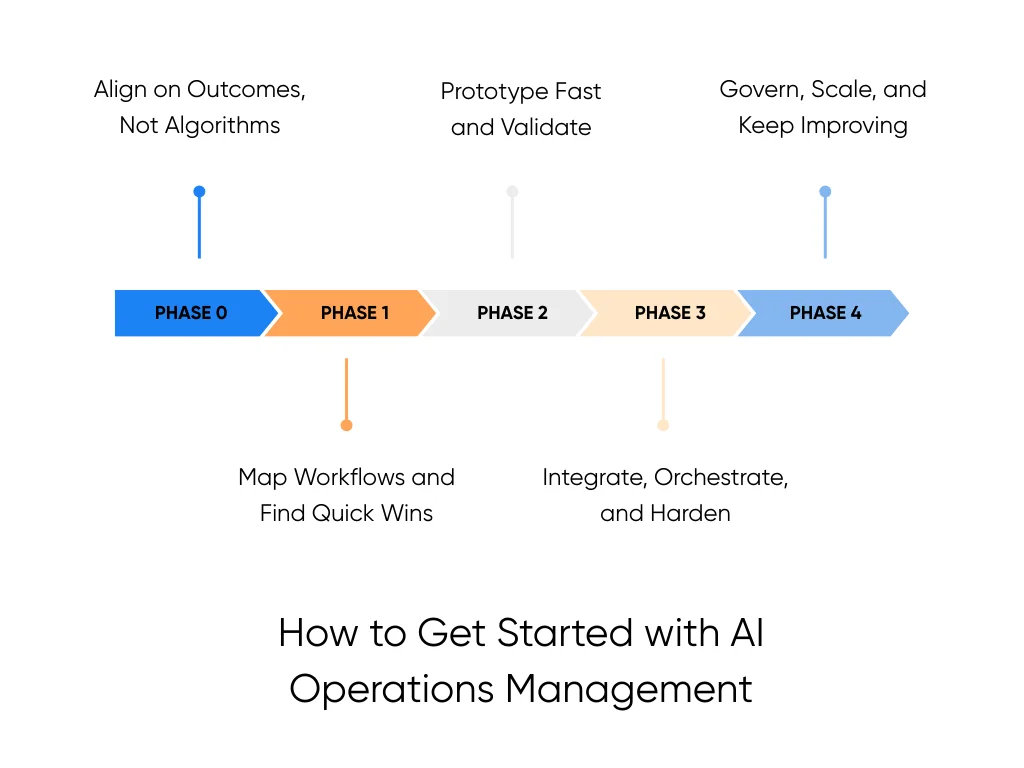
Phase 0: Align on Outcomes, Not Algorithms
Start with outcomes, not tools. Sit with your leads and list three to five pain points you feel every month, like SLA breaches, backlog spikes, stockouts, or repeat outages. Keep the list specific, not vague.
For each pain point, write four things in a short table: the KPI it hits, your current baseline, the target, and a rough dollar impact. For example, “first response time, 12 minutes now, target 6, overtime reduction worth a rough range.”
Add one more column for an AI hypothesis, such as “AI triage routes tickets faster” or “AI demand model sets better reorder points.” That table becomes your guardrail for the rest of the work.
If you’d like a second set of eyes on this, Aloa offers an AI consultation to help refine your pain points, KPIs, and AI hypotheses.
Phase 1: Map Workflows and Find Quick Wins
Next, pick one or two end-to-end workflows tied to those problems. Order to cash, incident management, or shared services intake all work well. Walk the flow from first trigger to final close and write down each step, tool, and handoff.
Mark the steps that are high volume, repetitive, rules-based, and data-rich. Those spots are strong AI candidates. For a first move, focus on low-risk, high-volume tasks like email or ticket triage, simple forecasting for a single product line, or a “sidecar” assistant that suggests replies for support staff.
Phase 2: Prototype Fast and Validate
Now run a small pilot instead of a big program. Aim for four to eight weeks, one workflow, one clear goal. Define success in numbers, such as “manual handling time down by 20%.” Keep humans in the loop to review samples and flag issues.
Set a decision point before you start. At the end, you either scale, adjust, or stop. When Aloa partners with teams here, we keep to that pattern, with short workshops, a fast prototype built on existing tools, and clear reports at the end.
Phase 3: Integrate, Orchestrate, and Harden
If the pilot works, plug AI into real work. That means feeding AI outputs into your ERP, CRM, ITSM, or workflow tools through normal integrations. AI suggests, automation executes simple steps, and your people handle exceptions and approvals.
Then harden the setup with logging, monitoring, role-based access, and audit trails. The goal is a steady helper in the background, not a fragile side project.
Phase 4: Govern, Scale, and Keep Improving
Last, treat AI operations management like any other important program. Decide who owns each AI use case, how often you review metrics, how teams raise issues, and how you watch for bias or model drift.
Form a small group across ops, IT, security, legal, and HR. Expand to new use cases only after current ones are stable, measured, and accepted by your teams. Over time, this steady pace gives you a growing stack of AI support without nasty surprises.
Choosing Your Stack: Off-the-Shelf Tools vs Custom Builds
You have a roadmap now. The next big question is: do you use off-the-shelf tools, or pursue a custom build?
We’ll go through the differences:
When Off-the-Shelf Tools Make Sense
Off-the-shelf tools are products that already include some form of AI-enabled feature. Think project trackers, ticketing systems, office suites, and automation platforms that are now powered by AI. They can write drafts, summarize tickets, or route requests more efficiently.
They work best when the work is standard. You turn the feature on, tweak a few settings, and your team gets a feel for AI without extra engineering.
Before you decide to go with these, check a few things:
- Security and compliance line up with your policies
- Data storage and sharing match your rules
- Integrations connect cleanly to your core systems
- Admin controls let you manage roles and changes
- Pricing still works when more teams start using it
Off-the-shelf tools exist for a reason. After you’ve looked at the details, you may find one that’s a solid fit for your situation. Just be clear on the tradeoffs: generic tools usually come with limits on workflows, data, or customization, and you often don’t see those until you’re deep into implementation. It’s almost always worth comparing it with custom development tailored to your operation.
When You Need Custom or Hybrid Solutions
Custom AI is tailored to your workflows, data, and business functions. You will need this when handling highly specialized or regulated work, such as clinical operations or financial risk checks. You also feel the need when one process touches ERP, warehouse tools, CRM, and internal apps, or when you want agentic AI that acts across systems under clear guardrails.
A common pattern is that standard tools handle generic tasks such as ticket tracking or document storage. Custom services sit on top, pull data from many systems, follow your rules, and suggest or trigger actions.
At Aloa, we design custom AI as a thin layer on top of your systems. We connect ERP, warehouse tools, CRM, and internal apps, and wire in models or agents that follow clear rules and guardrails.
Avoiding Tool Sprawl and Vendor Lock-In
Tool sprawl is when every team buys its own AI app. Vendor lock-in is when one provider owns so much of your stack that change feels painful. Both add friction.
To stay ahead, sketch a quick map with four layers:
- Data
- Models and AI services
- Workflow and agents
- User interfaces such as apps and chat
New tools should fit into that map, not create new islands. When you review a product, look for open APIs, clear data export, model choice, fair SLAs, and pricing that still makes sense as usage grows.
Many guides say off-the-shelf AI is enough to start, and we agree for first pilots. Once you push deeper into integration, risk, and governance, a thoughtful hybrid stack gives you more control and flexibility.
Key Takeaways
You’ve seen how AI operations management fits into a normal day. Less copy-paste and hunting for answers, more clear queues, better forecasts, and fewer “why are we hearing about this so late” moments. AI handles the grind, you and your team keep the judgment.
From here, your next steps are: Pick one or two pain points, line them up with a workflow, run a short pilot, and learn. Then keep what works and quietly fold it into the tools your teams already use.
If you’d like help mapping your operations and spotting 1–2 AI experiments worth running this quarter, give us a call. We'll sit with your team, unpack your workflows, and help design practical AI plays that respect your systems, data, and risk limits.
Also, we'd love to hear what you're wrestling with. Drop your biggest AI question in our AI Builder Community or catch quick, practical plays in our newsletter.
FAQs
What is AI in operations, in simple terms?
AI in operations means using software that learns from data to help run daily work. It reads patterns in tickets, orders, logs, or sensor data, then suggests actions or takes safe, pre-agreed steps. You still set the rules and goals, AI just helps you stay ahead instead of reacting late.

What are some real examples of AI improving operations?
You see AI routing support tickets to the right team, suggesting answers, and cutting wait times. In supply chain management, AI forecasts demand for key items so you order smarter and avoid stockouts. In IT, AI spots patterns in logs and alerts so your team fixes issues sooner and gets fewer false alarms.
Do I need a lot of data or a data science team to start?
You don't need a giant data lake or a full data science group to begin. You need one or two workflows with decent historical data and clear metrics, like handle time or SLA breach rate. From there, you can use off-the-shelf tools or work with a partner on a focused pilot while your data and skills mature over time.
Will AI replace my operations team?
AI will change some tasks your team does each day, but full replacement is very unlikely in most operations roles. AI handles repetitive tasks and pattern-based work, reduces human error, and surfaces better signals. Your team still owns judgment, complex cases, exceptions, and process changes. The goal is fewer fire drills and more time for the work only humans can do.